
How to use E-junkie Buy Now buttons?
Buy Now buttons skip past our shopping cart to take buyers directly to instant checkout for a single item. For this reason, each Buy Now button is associated with a particular payment processor for checkout, and Buy Now buttons cannot use features that depend on our shopping cart: Tax & Shipping calculation, Let buyer edit price, Variations/Variants, and certain types of Discounts (if you need to use those features, you should use our Cart buttons instead).
You can obtain Buy Now instant-purchase buttons/links for each product from the Button Codes screen in your E-junkie Dashboard:
- Whether you are adding a new product in Seller Admin for the first time or editing an existing product, you will arrive at the Button Codes screen once you click Submit to save the product's settings.
- If you just need to get codes for an existing product you've already added, in your E-junkie Dashboard just go to Manage Products > Get Purchase Buttons/Links and select a product from the menu there.
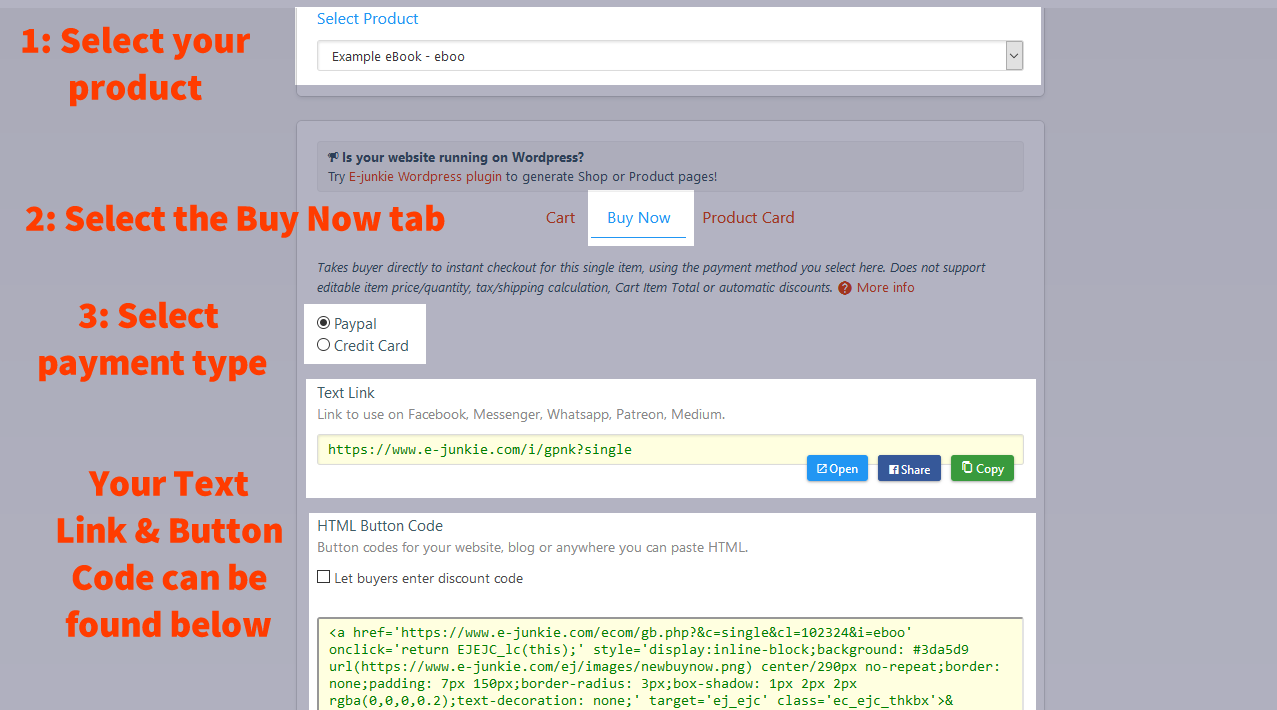
On the Button Codes screen, select the Buy Now tab to get that type of button code for the product. If you accept more than one payment processor, you will need to select which payment method your Buy Now button should use before you copy the code or link. If Buy Now button code is not provided, that means you have configured the product using Variants/Variations or "Let buyer edit price", which cannot work with Buy Now buttons.