
Did you know?
- You can sell anything with E-junkie, anywhere!
- You can sell digital goods, tangible goods, or even intangible services—e.g., software, ebooks, mp3s, phone cards, t-shirts, posters, books, CDs, DVDs, toys, knitting patterns, videos, stock photos, fonts, graphics, themes, discount coupons, artwork, clothing, articles, counseling sessions, event tickets, or anything else you can imagine!
- You can use E-junkie to accept donations or other variable-amount payments for pending invoices and auctions.
- It only takes a minute to start selling. Really.
How to start selling online with E-junkie
First, you will need to have an E-junkie account. You can start with a fully functional 14 day free trial, see our help page here to get registered.
Once you've entered your account this will be the first screen you see:
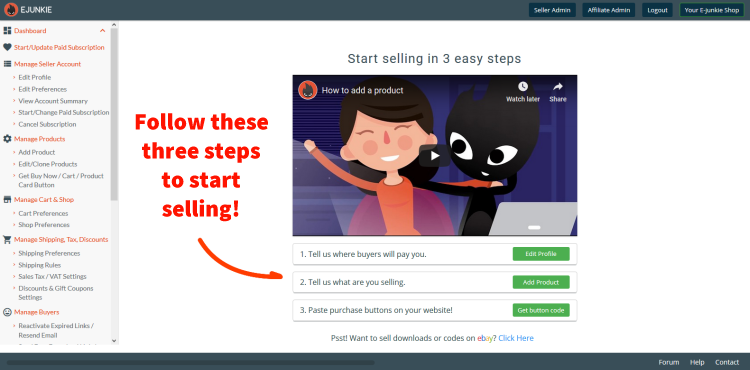
This screen links to the three basic steps you need to follow to start selling!
1. Tell us where buyers will pay you
E-junkie is not a payment processor, so we do not actually handle any of the money from your sales. You'll need an account with PayPal or one of our other supported payment systems to collect money directly from your buyers. Click the Edit Profile button here (or in the menu on your left) to enter that information.
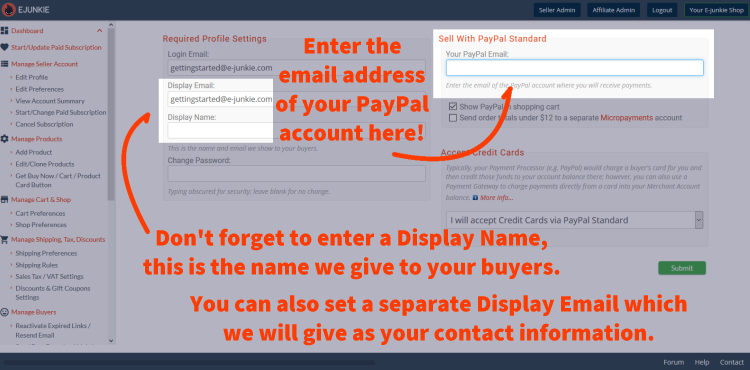
If you're using PayPal, just enter the email address for your PayPal account where indicated. That's all there is to it! We'll cover the rest of the details automatically, but you can read more here. If you plan to use a different payment system see the special instructions for each other option here.
Don't forget to enter your Display Name before leaving this screen. This is the name we'll show to your buyers, along with the Display Email as your contact address. You may change the Display Email so that it is a different address from the one you use to login. We will contact you via your Login Email with any notifications about your account, while buyers will reach you at your Display Email.
This is all the information we'll need about you on this end, and you can come back to update it at any time.
Click the green Submit button to return to your main dashboard for Step 2.
2. Tell us what you are selling
E-junkie can be used to sell a variety of products, both physical and downloadable (or both!). You'll find a variety of options to fill in this section, but only a few of these will be relevant to your needs. As a general rule, it's totally safe to ignore a setting that doesn't make any sense to you. That means it's probably for a different type of product than what you're selling.
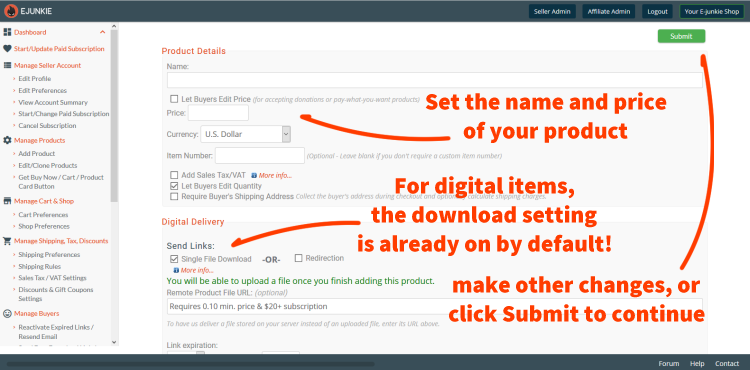
You'll always want to enter a name for your product and set it's price (even if it is 0.00). By default we will have the options Let Buyers Edit Quantity in Cart and Single File Download enabled since they are the most common settings needed, but you can change these as you see fit. Our help pages will cover the specifics about the other settings, many of which will have information links built into the product settings screen.
For each sale we display a Thank You Page with order details and also send out one or more Thank You Emails as confirmation. You don't need to edit your Thank You Email or Thank You Page messages yet—the default messages we provide contain everything that's necessary but you will have full control over them and can make changes at any time, see the linked pages for details.
Clicking the green Submit button at the top or bottom of this page will save your first product's settings and take you to a secondary screen
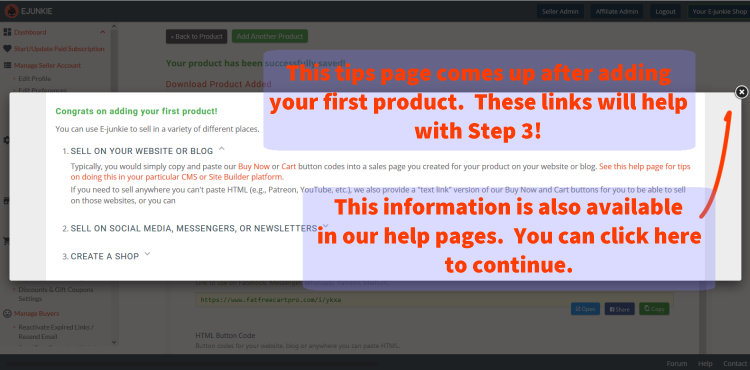
You'll see this after saving your first item, and the links here will help you on Step 3. Feel free to review them before proceeding, and this information can still always be found in our help pages.
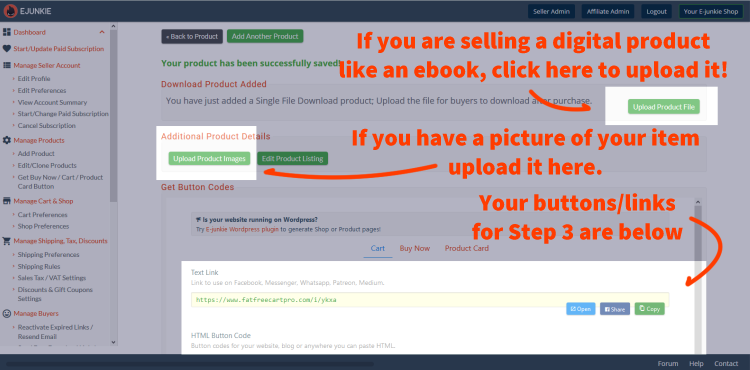
This screen is what you will see whenever you add or update a product. If you are adding a new downloadable item you can also upload your file here. Existing downloadable items will have an upload button on the main product screen.
You can also upload images for new items here as well. This is optional, but if your ebook has a cover image or you have a good promotional thumbnail image for our product here is where you'll add it.
Further down this page you can find quick access to the HTML code or link to add a product button to your site or social media page for Step 3, if that is where you will be selling. As always, this information will also always be available later if you need to come back to it.
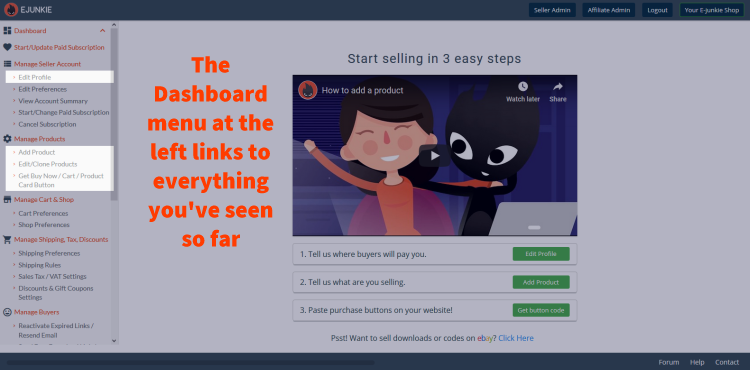
3. Paste Purchase Buttons on Your Website!
If you plan to sell from your own website
This is where you'll be leaving our system to work on that side, using the information you've obtained above. The exact steps to updating your own website will vary depending on your host and the tools you use to create or maintain your pages, but we have some tips for popular site-builders listed here. You don't need to be a professional webdesigner or know how to code to use our cart. We provide our cart buttons in HTML code which is the language that all websites are ultimately written in. You just need to use the HTML editing tools at your disposal to copy and paste our code into your site.
We have three types of buttons to fit any seller's needs:
- Shopping Cart buttons will work in any circumstance. These buttons display our cart directly from your own site and support all of our features.
- Buy Now buttons skip our cart and take buyers directly to instant checkout for a single item. These buttons work best if you are selling a single digital product like an ebook by providing a faster checkout process, although they do not support certain features that depend on our cart, such as free orders or tax/shipping calculation.
- Product Page buttons link to a mini sales page we prepare for you that is SEO-friendly and ready to work with Google or Facebook Analytics. This option is great if you don't have your own pre-built sales page or if you are selling via social media.
There are other places to sell besides your own website.
We also offer Text Links for all of our button types that can be used absolutely anywhere that you can paste or share a link, such as email newsletters, forum posts, and social networks like Twitter, Instagram or Facebook.
You can also create an E-junkie Shop page in our site's Marketplace, which shows some or all of your products on sales pages that we generate for you.
We can also help you sell via eBay. You won't need any of our buttons or links for this.