
NOTE: For "conversion tracking" see important notes here.
How to enable Google Analytics or Facebook Pixel tracking with E-junkie
Ecommerce Tracking for Google Analytics
When you set up Google Analytics tracking for your sales pages as covered below, whenever we generate a thank-you page and detect the buyer's browser has your Google Analytics tracking cookie, that page will automatcially include Google Analytics tracking code with Ecommerce Tracking data for GA to pick up; however, the consistency of this still depends on whether or not buyers actually view their thank-you page at some point after completing checkout.
If you are using an E-junkie Marketplace Shop or Product Page:
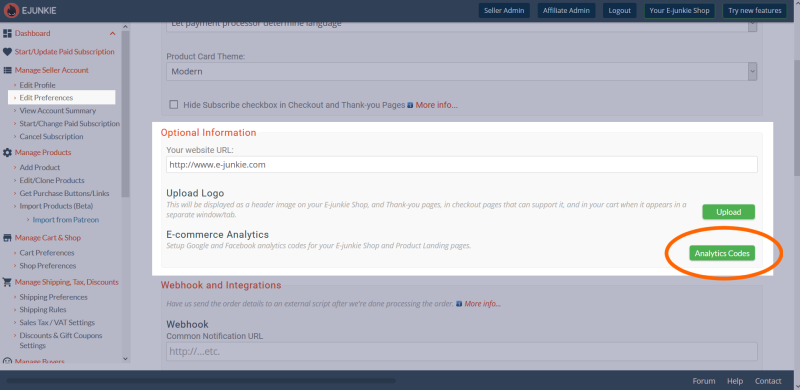
We have automatic support for tracking via Google Analytics 4 (GA4) and Facebook built into the sales pages we generate for a Product Page and/or your E-junkie Shop in our site's Marketplace. To take advantage of this, from your E-junkie Dashboard go to Manage Seller Account > Edit Preferences, then scroll down to the Optional Information section, click the Analytics Codes button there, and paste in your GA4 Property ID or Google Tag ID, and/or your Facebook App ID and Pixel ID. We'll take care of the rest by placing the necessary tracking code into your sales pages and on the post-sale thank-you page that we generate for each buyer.

If you are using E-junkie Add to Cart/View Cart buttons on your own site:
Our standard shopping cart and thank-you/download pages when used together support Google Analytics 4 and Facebook Pixel tracking automatically.
Sales pages on your own site that you wish to track must be using:
- Standard tracking code you obtain from Google and/or Facebook;
- Our new shopping cart and new thank-you pages (both standard for new sellers);
- E-junkie Add to Cart/View Cart buttons and Cart Script code to display the cart as an overlay within your own page.
With those requirements in place, our new thank-you pages will automatically insert the proper GA/FB tracking code (including Ecommerce Tracking details for GA) whenever it detects the buyer's browser has a tracking cookie set by that type of code in your sales pages. We can add cart-button click tracking to the regular Analytics page-traffic monitoring, and we also take care of context transfer and ensure that we don't report duplicate conversions if the buyer returns to their thank-you page again.
In this case, do not add any Google Analytics or Facebook tracking code into your E-junkie Thank-you Page customization fields, as that would conflict with the integrated GA tracking data we already provide there automatically. However, if you are redirecting buyers to a Common Thank-you Page URL or using product-based Redirection URLs, then you should place the same tracking code in that page that you're using elsewhere in your site.
If you are using E-junkie Buy Now buttons:
If you are only using E-junkie Buy Now buttons (rather than our Add to Cart/View Cart or Product Page buttons covered above), then you would need to follow Google's own instructions for "third party ecommerce" and paste their Analytics tracking code into your site's pages and into your E-junkie Common Thank-you Page HTML.
In this case, E-junkie would be completely uninvolved in your Google Analytics tracking, so it would not be possible to track Buy Now button clicks nor set up Ecommerce Tracking, and you would need to consult Google Analytics support for any assistance you may require. If you are using our standard thank-you pages, you may need to configure your GA tracking code for cross-domain measurement, or else you can redirect buyers to a Common Thank-you Page URL on your own site where you have placed the standard GA tracking code, in which case you should not need to configure cross-domain tracking.
Goals-based Conversion Tracking
This approach provides a sort of rudimentary "conversion tracking" if you aren't using Ecommerce Tracking with our standard GA tracking integration covered above, and would count every Goal tracked as a sales conversion—e.g., setting Goals in your Analytics account is one way to track conversions for Buy Now purchases. You will need to specify your Goal URL as:
https://www.fatfreecartpro.com/ecom/rp.php
(or if you are redirecting to a Common Thank-you Page URL on your site, you should use your page URL here), and under additional settings, set Match Type as Begins With (aka Head Match). See this FAQ page to see if your use of E-junkie will be able to track Goals consistently.
How to enable conversion tracking for other services
All these services will provide you with a custom code snippet that they require you to place on your "thank you" or "conversion" page. If they provide a "secure" variant of their code, you should use that. The best place to paste this code is in your Common Thank-you Page Customization in E-junke Dashboard under Manage Seller Account > Edit Preferences. If the code is product-specific, you can paste that in the Product Thank-you Page HTML field of that product's settings. If the code requires you to use some transaction or product specific data, you may be able to use template variables for that.
See the FAQ and Tips links below for further details about factors that can interfere with tracking conversions via thank-you page visits when you use E-junkie, and some suggestions to make this process more reliable if you don't sell downloads and/or are required to have the conversion page on your own site (rather than on a third-party site like the thank-you pages E-junkie would normally generate for you).
Customize Thank-you Pages Create and manage an affiliate program Selling Ebooks and PDF Stamping Sending Updates and Newsletters Customize Thank-you Email Discounts and Sales Charging Sales Tax and VAT Integration with custom scripts and third-party services Transaction Log Block Buyers/Transactions Shipping and Packaging calculator Inventory Management Webhook integration with custom scripts and third-party services